출처에 따라 여러 개의 CD에서 수백 개의 파일이 오디오북에 들어 있을 수 있습니다.
각 CD에는 트랙 번호가 따로 있어서 앨범 전체에 이름이 같은 트랙이 여러 개 있을 수 있습니다.
일부 오디오 플레이어에서는 올바른 순서를 알려주는 것이 악몽과도 같습니다.
Track Entitler는 단순히 트랙 번호를 기준으로 트랙에 자동으로 이름을 지정하는 기능만 제공합니다.
프로세스
- 모든 파일에 트랙 번호가 올바르고 순차적으로 있는지 확인하세요.
- 제목을 변경하려는 모든 트랙을 선택하세요.
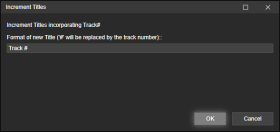
- 태그 편집을 마우스 오른쪽 버튼으로 클릭(또는 도구 > 태그 편집 사용)하고 제목 증가를 선택합니다.
- 새로 등록하려는 트랙에 들어갈 텍스트를 추가합니다.
문자 #은 트랙 번호로 대체됩니다.
예시
길 #
트랙 1
트랙 2
트랙 3
...
초승달 # 102개 중
초승달 1/102
초승달 2/102
초승달 3/102
...
Depending on your source - you may have hundreds of files in an audiobook from several CDs.
Each CD its own track numbers, which means you may end up with several identically named tracks in the entire album.
A nightmare for some audio players to gifure out the correct order.Track Entitler merely offers the possiblilty to automatically name the tracks based on the track number.
Process
- Make sure all files have Track Numbers in correct, sequential order.
- Select all tracks you want re-entitled.
- Right-click Edit Tags (or use the Tools > Edit Tags), and select Increment Titles.
- Add the text that you want your newly entitled tracks to have.
The character # will be replaced by the track number.Examples
Track #
Track 1
Track 2
Track 3
...
New Moon # of 102
New Moon 1 of 102
Hide original
New Moon 2 of 102
New Moon 3 of 102
...
By
ConcernedWife
제출자 ConcernedWife
업데이트됨 08/10/2025
버전 기록 / 세부 정보
- 버전:
- 1.0.2
- 업데이트됨:
- 08/10/2025
- Size:
- 2.41 KB
- 다음과 함께 작동합니다:
- Media Monkey 5 - 5
- 변경 사항:
Initial version