최신 애드온
MediaMonkey 5의 재생 통계 관리
Manage Play Stats 는 MediaMonkey 5용 추가 기능( Bex 의 Add/Remove Playstat MM4 스크립트 기반)으로, 재생 기록(Played 테이블), 재생 횟수(PlayCounter), 마지막 재생 날짜(LastPlayedDate) 등 재생 통계를 정밀하게 수동으로 관리할 수 있도록 설계되었습니다. 이 기능은 타사 플레이어에서 재생 기록을 가져오거나, 잘못된 타임스탬프를 수정하거나, 실수로 재생한 파일을 되돌리거나, 통계를 일괄 정리하는 등 표준 MM5 UI에서 지원하지 않는 다양한 시나리오를 위한 내장 도구를 제공합니다.
주요 특징
추가하다
재생 횟수 추가 및 타임스탬프 추가: 한 번의 클릭으로 선택한 트랙의 재생 횟수를 현재 타임스탬프와 함께 즉시 기록하고 재생 횟수 카운터를 증가시킵니다.
재생, 타임스탬프 X 추가: 하나 이상의 트랙에 사용자 지정 타임스탬프를 지정합니다. 시작 (정방향) 및 종료 (역방향) 계산 기준을 모두 지원하여 트랙의 재생 시간에 따라 순차적으로 트랙을 정렬할 수 있습니다.
재생 횟수 추가...: 지정된 날짜/시간 범위에 걸쳐 단일 트랙의 여러 재생 기록 항목을 분산합니다. 미리 보기 기능, 지능형 기준점 설정, 용량 검사 기능을 포함하여 재생 간 간격이 비현실적으로 벌어지는 것을 방지합니다.
제거하다
재생 기록 삭제...: 특정 트랙의 모든 재생 기록을 체크 가능한 목록으로 표시하여 선택적으로 삭제할 수 있으며, 재생 횟수(PlayCounter)와 마지막 재생 날짜(LastPlayedDate)를 자동으로 재정렬하는 옵션도 제공합니다.
지정된 기간 내 모든 재생 기록 삭제: 선택한 트랙 또는 전체 라이브러리에서 지정된 기간 내 재생 기록을 일괄 삭제합니다. 실시간 미리보기 기능과 2단계 확인 대화 상자를 통해 실수로 인한 데이터 손실을 방지합니다.
조정하다
플레이 카운터만 조정...: 마지막 플레이 날짜를 변경하거나 추가 기록 레코드를 삽입하지 않고 플레이 카운터 값을 수정합니다(설정, 증가, 감소 또는 실제 기록 횟수와 일치하도록 재동기화).
마지막 재생 날짜 설정...: 트랙의 마지막 재생 타임스탬프를 직접 업데이트합니다. 기존 재생 기록 중 가장 최근 항목을 선택한 날짜로 이동하거나, 이전 기록이 없는 경우 일치하는 항목을 새로 생성합니다.
LastPlayedDate를 HistoryPlay에 추가...: 기존 LastTimePlayed 요약 태그를 Played 테이블의 적절한 기록으로 채웁니다(기기 동기화 후 노래 메타데이터가 업데이트되었지만 기록 항목이 생성되지 않은 경우에 유용합니다).
Manage Play Stats for MediaMonkey 5
Manage Play Stats is a MediaMonkey 5 add-on (based on the Add/Remove Playstat MM4 script by Bex) designed for precise manual management of playback statistics—including play history (the Played table), PlayCounter, and LastPlayedDate. It provides built-in tools for scenarios that standard MM5 UI does not cover, such as importing play history from third-party players, correcting invalid timestamps, undoing accidental plays, or performing bulk statistics cleanups.
Key Features
Hide original
Add
Add one Play, Timestamp Now: Instantly logs a single playback entry with the current timestamp and increments the play counter for a selected track with a single click.
Add one Play, Timestamp X...: Assigns a custom timestamp across one or multiple tracks. Supports both Start (forward) and End (backward) calculation anchors to sequence tracks sequentially based on their durations.
Add Plays...: Distributes multiple play history entries for a single track across a defined date/time range. Includes preview capabilities, intelligent anchoring, and capacity checks to prevent unrealistic spacing between plays.
Remove
Remove Plays...: Displays every playback record for a single track in a checkable list for targeted removal, with optional automatic re-alignment of PlayCounter and LastPlayedDate.
Remove all Plays in Period...: Bulk-deletes playback entries within a specified timeframe for selected tracks or the entire library. Features live preview feedback and a two-step confirmation dialog to prevent accidental data loss.
Adjust
Adjust Only PlayCounter...: Modifies PlayCounter values (set, increment, decrement, or resync to match actual history counts) without altering LastPlayedDate or inserting extra history records.
Set LastPlayedDate...: Directly updates the last played timestamp for a track. Moves the newest existing play entry to the chosen date or creates a single matching entry if no prior history exists.
Add LastPlayedDate as HistoryPlay...: Backfills an existing LastTimePlayed summary tag as a proper record in the Played table (useful after device syncs that updated song metadata without creating history entries).
By
fetzenschaedl
제출자 fetzenschaedl
업데이트됨 26/07/2026
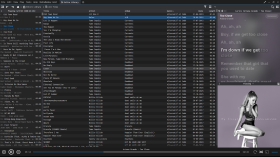
MediaMonkey용 음절 가사
Syllable Lyrics는 MediaMonkey 5 및 MediaMonkey 2024에 단어별 동기화된 노래방 하이라이팅 기능을 추가합니다.
특징
- 재생과 동기화된 단어 및 음절 강조 표시
- 클릭 가능한 시간 제한 검색 라인
- 활성화된 가사 라인의 부드러운 자동 중앙 정렬
- 내장된 향상된 LRC 및 TTML 단어 타이밍
- 일반 LRC 회선 타이밍 및 평문 대체
- 제공자가 제공하는 경우 백그라운드 보컬 및 교대 가수 배치
- Lyrics+와 호환되는 KPOE, Unison 및 LRCLIB 온라인 조회 기능
- 선택적 제공업체 또는 Google 기반 로마자 표기
- 일반 모드와 전체 화면 모드에서 현재 앨범 아트 배경이 흐릿하게 표시됩니다.
- 설정 가능한 타이밍 오프셋, 온라인 조회 및 부드러운 스크롤링
Syllable Lyrics for MediaMonkey
Syllable Lyrics adds synchronized word-by-word karaoke highlighting to MediaMonkey 5 and MediaMonkey 2024.
FeaturesHide original
- Word and syllable highlighting synchronized with playback
- Clickable timed lines for seeking
- Smooth automatic centering of the active lyric line
- Embedded enhanced LRC and TTML word timing
- Ordinary LRC line timing and plain-text fallback
- Background vocals and alternating singer alignment when supplied by the provider
- Lyrics+ compatible KPOE, Unison, and LRCLIB online lookup
- Optional provider or Google-powered romanization
- Blurred current-album-art backgrounds in normal and fullscreen modes
- Configurable timing offset, online lookup, and smooth scrolling
By
GhosT
제출자 ghost.specialgrade
업데이트됨 19/07/2026
버전 기록 / 세부 정보
- 버전:
- 0.1.20
- 업데이트됨:
- 19/07/2026
- Size:
- 25.15 KB
- 특허:
- MIT License
- 다음과 함께 작동합니다:
- Media Monkey 5.0.0 - 5.0.0

IBM Carbon 그레이스케일 팔레트를 사용한 Flat Monkey 스킨의 다크 버전 리쉘입니다. 옵션에서 바로 무료 포인트 색상 선택기를 사용할 수 있습니다. Ventis Media의 Flat Monkey를 비공식적으로 파생한 버전으로, 완전 무료입니다.
Flat Monkey Dark는 Flat Monkey를 IBM Carbon 회색조 팔레트(창 #161616, 패널 #262626, 테두리 #393939, 텍스트 #f4f4f4)로 재구성한 버전입니다. 전체 UI는 어두운 회색 단색이며, 유일하게 사용된 색상은 사용자가 직접 선택할 수 있는 포인트 색상입니다.
기존 버전처럼 어둡거나 밝은 테마, 주황색 또는 파란색과 같은 고정된 테마 선택 옵션 대신, 도구 > 옵션 > 스킨에서 원하는 색상을 자유롭게 선택할 수 있습니다. 기본값은 해바라기 노란색(#FFE000)이지만, 실제 색상 선택기이므로 어떤 색상이든 사용할 수 있습니다. 선택한 색상은 플레이어 강조 표시, 현재 재생 중인 트랙, 진행률 및 볼륨 슬라이더, 바로 가기 링크, 탐색 파형, 선택된 행에 적용됩니다. 강조된 영역의 텍스트, 별점, 아이콘은 어두운 색과 밝은 색 사이에서 자동으로 전환되므로 어떤 색상을 선택하든 가독성이 유지되며, 내장된 가독성 보호 기능이 가독성이 떨어지는 선택을 차단합니다.
원본과 비교했을 때 변경된 사항은 다음과 같습니다. 선택된 행은 모든 창에서 전체 강조 색상을 사용하며 마우스 오버 시 회색 깜빡임 현상이 없습니다. 창에서 포커스가 사라지더라도 선택 항목이 계속 표시됩니다. 제목 표시줄과 패널은 둥근 모양 대신 사각형으로 변경되었습니다. 메인 창을 더욱 깔끔하게 하기 위해 탐색 경로 표시줄이 숨겨졌습니다. 또한 크기 옵션(소형/보통/대형)이 추가되었습니다. 레이아웃, 아이콘, 글꼴, 동작 방식 등 그 외 모든 부분은 Flat Monkey 버전과 동일합니다.
설치 방법: Flat Monkey Dark.mmip 파일을 다운로드한 다음, MediaMonkey에서 도구 > 추가 기능 > 추가로 이동하여 파일을 선택합니다. 그 후, 도구 > 옵션 > 레이아웃/스킨에서 해당 스킨을 선택하세요.
이 스킨은 Ventis Media, Inc.의 Flat Monkey(c) 스킨을 비공식적으로 변형한 것으로, Ventis Limited 상호 라이선스에 따라 수정 및 공유되었으며, 해당 라이선스는 파생 스킨 제작을 명시적으로 허용합니다. Ventis Media와는 어떠한 제휴 관계도 없으며, Ventis Media의 승인이나 지원을 받지 않습니다. 이 스킨은 무료이며, 유료 버전이나 광고 메시지는 없습니다.
소스 코드 및 이슈 트래커: https://github.com/junkerderprovinz/flat-monkey-dark
Translated automatically (see original)A dark-only reshell of the bundled Flat Monkey skin in the IBM Carbon greyscale palette, with a free accent colour picker right in the options. Unofficial derivative of Flat Monkey by Ventis Media, completely free.
Flat Monkey Dark re-shells Flat Monkey in the IBM Carbon greyscale palette: window #161616, panels #262626, borders #393939, text #f4f4f4. The whole UI is monochrome grey, dark only, and the single splash of colour is an accent you pick yourself.
Instead of the original's fixed theme choices (dark or light, orange or blue) there is one free accent colour picker in Tools > Options > Skin. The default is sunflower yellow (#FFE000), but it is a real colour picker, so any colour works. The accent drives the player highlight, the now-playing track, the progress and volume sliders, hotlinks, the seek waveform and the selected rows. Text, rating stars and icons on accent surfaces switch automatically between dark and light, so whatever colour you pick stays readable, and a built-in readability guard blocks choices that would not.
Other changes compared to the original: selected rows use the full accent colour in every pane with no grey flash on hover, the selection stays visible when a pane loses focus, title bars and panels are square instead of rounded, the breadcrumb path bar is hidden for a cleaner main window, and there is a size option (Small / Normal / Large). Everything else (layout, icons, fonts, behaviour) is Flat Monkey unchanged.
Install: download Flat Monkey Dark.mmip, then in MediaMonkey go to Tools > Add-ons > Add and pick the file. After that, select the skin under Tools > Options > Layout / Skin.
This is an unofficial derivative of Flat Monkey (c) Ventis Media, Inc., modified and shared under the Ventis Limited Reciprocal License, which explicitly permits derivative skins. It is not affiliated with, endorsed by or supported by Ventis Media. The skin is free, with no paid version and no nags.
Source code and issue tracker: https://github.com/junkerderprovinz/flat-monkey-dark
Hide original
By
Junker der Provinz
제출자 junkerderprovinz
업데이트됨 02/07/2026
버전 기록 / 세부 정보
- 버전:
- 1.1
- 업데이트됨:
- 02/07/2026
- Size:
- 391.93 KB
- 특허:
- Ventis Limited Reciprocal License
- 다음과 함께 작동합니다:
- Media Monkey 5.0.2 - 2024.9999
- 변경 사항:
Initial public release (v1.1.0).
Dark-only IBM Carbon reshell of the bundled Flat Monkey skin: the whole UI goes neutral dark grey (window #161616, panels #262626, text #f4f4f4) and the single splash of colour is yours to pick.
- Free accent colour picker in Tools > Options > Skin (default sunflower #FFE000), with a readability guard
- Auto-contrast text, rating stars and icons on any accent (dark on light accents, light on dark ones)
- Uniform accent selection in every pane, in both focus states, no grey flash on hover
- Seek waveform in the exact accent colour
- Square title bars and panels, hidden breadcrumb bar, size option (Small / Normal / Large)Unofficial derivative of Flat Monkey (c) Ventis Media, Inc., under the Ventis Limited Reciprocal License. Free.
.png)
MediaMandrill은 MediaMonkey 2024용 추가 모듈입니다. 웹 인터페이스를 제공하여 음악 라이브러리를 탐색하고 MediaMonkey 플레이어를 원격으로 제어할 수 있습니다.
github: https://github.com/xhitespirit/MediaMandrill
포럼: https://www.mediamonkey.com/forum/viewtopic.php?t=109500
MediaMandrill is an add‑on module for MediaMonkey 2024. It provides a web interface that allows browsing the music library and remotely controlling the MediaMonkey player.
github: https://github.com/xhitespirit/MediaMandrill
Hide original
forum: https://www.mediamonkey.com/forum/viewtopic.php?t=109500
By
xhitespirit
제출자 xhitespirit
업데이트됨 16/07/2026
트랙 이력 전송 1.1.5
트랙 히스토리 전송은 MediaMonkey 5의 핵심 애드온으로, 기존 트랙을 더 나은 버전으로 교체할 때 수년간의 청취 기록이 손실되는 문제를 해결하기 위해 개발되었습니다. MP3 파일을 FLAC으로 업그레이드하거나, 리마스터링 버전을 추가하거나, 중복 앨범을 정리하는 경우에도 트랙 히스토리 전송은 재생 횟수, 평점, 태그, 전체 재생 기록을 기존 파일에서 새 파일로 정확하고 안전하게 전송합니다.
지능형 점수 기반 매칭 기능을 통해 트랙 히스토리 전송은 혼합된 트랙에서도 길이, 트랙 번호 및 제목 유사성을 기준으로 소스 트랙과 대상 트랙을 자동으로 짝지어 줍니다. 드래그 앤 드롭 방식으로 짝을 편집할 수 있는 확인 대화 상자를 통해 저장 전에 모든 설정을 완벽하게 제어할 수 있으며, 전용 손실 압축 → 무손실 압축 모드와 라이브러리 전체에서 중복 앨범을 찾는 스캐너를 통해 일괄 정리 작업을 빠르고 안정적으로 수행할 수 있습니다.
트랙 기록 전송 기능은 재생 횟수를 덮어쓰는 대신 병합하고, 외부 아트워크 및 재생 목록 멤버십을 전송하며, 전송이 확인되면 선택적으로 소스 정리(통계 초기화, 데이터베이스에서 제거 또는 파일 전체 삭제)를 수행하는 등 중요한 세부 사항도 처리합니다.
시간이 지남에 따라 음악 라이브러리를 업그레이드하고 청취 기록을 처음부터 다시 시작하고 싶지 않은 모든 사용자를 위해 설계된 트랙 히스토리 트랜스퍼는 정확한 매칭과 모든 전송에 대한 투명하고 검토 가능한 워크플로를 제공합니다.
설치 및 사용 방법에 대한 자세한 내용은 함께 제공되는 readme.md 파일을 참조하십시오.
⚠️ 이 추가 기능을 사용할 때는 주의하십시오. 트랙 기록 전송 기능은 트랙 데이터, 통계 및 파일을 영구적으로 수정하거나 삭제할 수 있습니다. 잘못된 사용(잘못된 소스/대상 연결, 의도치 않은 삭제 옵션 등)은 데이터 손실을 초래할 수 있습니다. 이 추가 기능은 제한된 규모에서만 테스트되었습니다. 특히 중복 앨범 찾기와 같은 일괄 작업이나 소스 정리 옵션이 포함된 전송 작업을 수행하기 전에는 항상 MediaMonkey 데이터베이스를 백업하십시오 .
주요 특징
- 스마트 스코어 매칭 : 재생 시간, 트랙 번호 및 제목 유사도를 기준으로 소스 트랙과 대상 트랙을 자동으로 매칭합니다.
- 통계 전송 : 플레이 횟수, 마지막 플레이 시간, 건너뛰기 횟수, 추가 날짜 및 평점
- 플레이 기록 전송 : 총 플레이 횟수뿐만 아니라 개별 플레이 시간도 보존합니다.
- 재생 횟수 병합 : 원본과 대상의 재생 횟수를 덮어쓰지 않고 합산합니다.
- 완벽한 태그 및 필드 지원 : 제목, 아티스트, 앨범, 장르, 작곡가, 분류 필드 및 10개의 사용자 지정 필드를 모두 개별적으로 선택할 수 있습니다.
- 손실 압축 → 무손실 압축 모드 : 혼합된 앨범에서 기존 포맷과 새로운 포맷의 트랙을 자동으로 분리합니다.
- 중복 앨범 찾기 : 전체 라이브러리를 스캔하여 손실 압축 버전과 무손실 압축 버전이 모두 있는 앨범을 찾습니다.
- 확인 대화 상자 : 전송 전에 드래그 앤 드롭으로 쌍을 재할당할 수 있는 미리보기 기능을 제공합니다.
- 재생 목록 및 아트워크 이전 : 재생 목록 멤버십과 외부 앨범 커버 아트를 그대로 유지합니다.
- 소스 정리 옵션 : 통계 지우기, 데이터베이스에서 제거 또는 소스 파일 삭제 - 선택 사항입니다.
Track History Transfer 1.1.5
Track History Transfer is a focused MediaMonkey 5 add-on built to solve one recurring problem: replacing a track with a better version shouldn't mean losing years of listening history. Whether you're upgrading an MP3 to FLAC, swapping in a remastered edition, or cleaning up duplicate albums, Track History Transfer moves play counts, ratings, tags, and full play history from the old file to the new one — accurately and safely.
With intelligent score-based matching, Track History Transfer automatically pairs source and target tracks by duration, track number, and title similarity, even across mixed selections. A confirmation dialog with drag-and-drop pair editing gives you full control before anything is written, while a dedicated Lossy → Lossless mode and a library-wide Find Duplicate Albums scanner make batch cleanups fast and reliable.
Track History Transfer also handles the details that matter: merging play counts instead of overwriting them, transferring external artwork and playlist memberships, and optional source cleanup — clear stats, remove from database, or delete the file entirely — once a transfer is confirmed.
Built for anyone who upgrades their library over time and refuses to start their listening history from zero, Track History Transfer combines precise matching with a transparent, reviewable workflow for every transfer.
For setup and usage details, see the bundled readme.md.
⚠️ Please use this add-on with care. Track History Transfer can permanently modify or delete track data, statistics, and files — incorrect usage (wrong source/target pairing, unintended delete options, etc.) can result in data loss. This add-on has only been tested on a limited scale. Always create a backup of your MediaMonkey database before using it, especially before batch operations like Find Duplicate Albums or any transfer involving the source cleanup options.
Key Features
Hide original
- Smart Score Matching: Automatically pairs source and target tracks by duration, track number, and title similarity
- Statistics Transfer: Play Count, Last Played, Skip Count, Date Added, and Rating
- Play History Transfer: Preserves individual play timestamps, not just the total count
- Merge Play Count: Adds source and target play counts together instead of overwriting
- Full Tag & Field Support: Title, Artist, Album, Genre, Composer, Classification fields, and 10 Custom Fields — all individually selectable
- Lossy → Lossless Mode: Automatically separates old and new format tracks from a mixed album selection
- Find Duplicate Albums: Scans your entire library for albums with both lossy and lossless versions
- Confirmation Dialog: Side-by-side preview with drag-and-drop pair reassignment before any transfer
- Playlist & Artwork Transfer: Keeps playlist memberships and external cover art intact
- Source Cleanup Options: Clear statistics, remove from database, or delete the source file — entirely optional
By
AI (Inspired by Fetznschaedl)
제출자 fetzenschaedl
업데이트됨 29/07/2026
버전 기록 / 세부 정보
- 버전:
- 1.4.1
- 업데이트됨:
- 29/07/2026
- Size:
- 98.81 KB
- 다음과 함께 작동합니다:
- Media Monkey 2024 - 2024
- 변경 사항:
- Changelog Summary (v1.2.0 – v1.4.1)
-
Analyze Volume Options & Fixes (v1.3.0 – v1.4.1)
-
v1.4.1: Fixed a bug where forcing re-analysis failed because the addon reset values to null instead of MediaMonkey’s actual "unknown" sentinel (-999999). Target tracks now reliably re-analyze regardless of global settings.
-
v1.4.0: Added an optional sub-setting to "Force re-analysis" for target tracks by temporarily setting their volume values to "unknown" before calling analyzeVolume(), bypassing MM5's global "Only analyze unknown" setting.
-
v1.3.1: Resolved a race condition where running Analyze Volume alongside transfers could falsely report deleted source files as inaccessible background errors. It now executes strictly after all source cleanup tasks complete.
-
v1.3.0: Added an option (in settings and the transfer dialog) to automatically run a batched, background Analyze Volume pass on target tracks after a transfer completes across all transfer paths.
-
-
Experimental Feature: Find Duplicate Albums (v1.2.0 – v1.2.1)
Note: The Find Duplicate Albums additions detailed below are currently experimental.
-
v1.2.1: Enhanced Stage 3 ("Fuzzy") detection to tolerate minor typos in album titles (using $ge 85%$ edit-distance similarity), catching small spelling differences like "Live in London" vs. "Live in Londons".
-
v1.2.0: Extended detection beyond single album entries to identify cross-folder duplicates across separate lossy/lossless entries. Introduced three confidence tiers in the UI: ● Exact, ◆ Tag match, and ◇ Fuzzy (which prompts a confirmation dialog before initiating transfers).
-
-
- 버전:
- 1.1.8
- 업데이트됨:
- 07/07/2026
- Size:
- 82.53 KB
- 다음과 함께 작동합니다:
- Media Monkey 2024
- 변경 사항:
-
-
v1.1.6 (New Feature): Added a "Remove source from playlist(s)" option to prevent duplicate tracks in playlists post-transfer. Automatically disables if playlist transfer is off or a delete task is active.
-
v1.1.7 (Bugfix): Fixed direct transfer mode (actions_add.js), where the new playlist removal feature was being bypassed.
-
v1.1.8 (Bugfix): Fixed a UI bug in dlgTransferConfirm.js where the removal checkbox incorrectly stayed greyed out on open due to initialization timing.
-
-
- 버전:
- 1.1.5
- 업데이트됨:
- 21/06/2026
- Size:
- 78.31 KB
- 다음과 함께 작동합니다:
- Media Monkey 2024 - 2024