MediaMonkey의 관리 능력을 확장합니다.
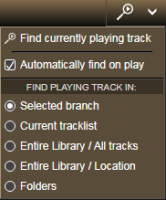
프로그램이 다른 트랙을 재생하기 시작할 때마다 미디어 트리의 선택된 분기 내에서 현재 재생 중인 트랙이 포함된 폴더를 자동으로 찾아 표시할 수 있습니다. 포함된 폴더를 찾으면 현재 재생 중인 트랙이 메인 트랙 목록에서 선택됩니다.
직접 다운로드할 수 없으며, 기부금을 받은 후 이메일로 애드온이 전송됩니다. MM4의 무료 버전은 웹사이트에서 다운로드할 수 있습니다.
Translated automatically (see original)It allows finding and displaying of the folder that contains the currently playing track within the selected branch of the Media Tree automatically whenever the program starts to play another track. After the containing folder is located, the currently playing track will be selected in the main tracklist.
There is no direct download, the add-on will be send by e-mail after received donation. The free version for MM4 is available for download at its web site.
Hide original
By
Zvezdan Dimitrijević
제출자 ZvezdanD
업데이트됨 20/06/2022
버전 기록 / 세부 정보
- 버전:
- 2.0
- 업데이트됨:
- 20/06/2022
- 다음과 함께 작동합니다:
- Media Monkey 5
- 변경 사항:
Added: version of the add-on for MediaMonkey v5.
이 애드온은 파일 목록에서 비트레이트가 낮은 파일을 강조 표시합니다.
Translated automatically (see original)This addon highlights low-bitrate files in file listings.
Hide original
By
Ventis Media, Inc
제출자 drakinite
업데이트됨 08/12/2020
상위 목록 모니터
Top List Monitor는 MediaMonkey 5의 청취 기록을 동적이고 상호작용적인 순위 목록( 최고 앨범 , 최고 노래 , 최고 아티스트 )으로 변환하여, 상세한 지표를 통해 순위를 효율적으로 분석하고 향상시킬 수 있도록 도와줍니다.
주요 특징 및 작동 방식
3. 전용 순위 보기: 누적 재생 횟수(앨범/아티스트) 또는 개별 트랙 재생 횟수(곡) 기준으로 상위 항목을 추적합니다.
스마트 순위 결정 방식: 표준 경쟁 순위(1-2-2-4)를 사용하며, 동점일 경우 공정하게 처리합니다(동점 항목은 절대 제외되지 않습니다).
동기 부여 청취 측정 지표:
다음 순위/목표 달성까지: 다음 순위(50의 배수) 또는 최고 목표(상위 100위, 상위 50위 등)에 도달하는 데 필요한 정확한 플레이 횟수를 보여줍니다.
효율성 및 시간 효율성: "재생당 순위 상승"과 "청취 시간 1시간당 순위 상승"을 계산합니다.
리드 및 핫존 지표: 근접한 격차(노란색 "핫존")를 강조 표시하고, 하위 순위의 리드를 색상 코드(빨간색/노란색/녹색)로 구분된 알림과 함께 시각화합니다.
포화도 및 평균: 청취 습관이 얼마나 집중되어 있는지 보여줍니다(예: 전체 재생 횟수 중 상위 10/100곡의 비율).
강력한 필터링 및 탐색 기능:
장르 , 발매 연도 또는 재생 연도 별로 필터링할 수 있습니다(예: 특정 연도에 재생된 1990년대 발매 음반 분석).
항목을 클릭하면 MediaMonkey 라이브러리에서 해당 앨범, 트랙 또는 아티스트로 바로 이동합니다.
원클릭 플레이리스트 내보내기: 아티스트별 인기 앨범 $N$개, 노래 또는 인기 트랙을 전용 폴더에 그룹화된 고정 플레이리스트로 내보낼 수 있습니다.
완벽한 맞춤 설정: 카테고리별로 개별 목록 길이, 최소 재생 횟수, 재생 목록 내보내기 크기를 설정할 수 있습니다.
Top List Monitor
Top List Monitor turns your MediaMonkey 5 listening history into dynamic, interactive ranking lists (Top Albums, Top Songs, and Top Artists) with detailed metrics to help you analyze and boost your rankings efficiently.
Key Features & Functionality
Hide original
3 Dedicated Ranking Views: Tracks top items by cumulative play counts (Albums/Artists) or single track plays (Songs).
Smart Ranking Logic: Uses standard competition ranking (1-2-2-4) with fair tie handling (tied items are never omitted).
Motivational Listening Metrics:
To Next Rank / Milestone: Shows exact play counts needed to reach the next position, multiple of 50, or top milestone (Top 100, Top 50, etc.).
Efficiency & Time-Efficiency: Calculates "rank places gained per play" and "places gained per hour of listening time".
Lead & Hot Zone Indicators: Highlights close gaps (yellow "Hot Zone") and visualizes leads over lower ranks with color-coded alerts (Red/Yellow/Green).
Saturation & Averages: Displays how concentrated your listening habits are (e.g., % of total plays in your Top 10/100).
Powerful Filtering & Navigation:
Filter by Genre, Release Year, or Play Year (e.g., analyze 1990s releases played in a specific year).
Click any entry to jump directly to that album, track, or artist in your MediaMonkey library.
1-Click Playlist Export: Export Top $N$ albums, songs, or top tracks per artist as static playlists grouped in a dedicated folder.
Fully Customizable: Set individual list lengths, minimum play thresholds, and playlist export sizes per category.
By
AI (Inspired by Fetznschaedl)
제출자 fetzenschaedl
업데이트됨 25/10/2026
버전 기록 / 세부 정보
- 버전:
- 0.32.3
- 업데이트됨:
- 25/10/2026
- Size:
- 318.66 KB
- 다음과 함께 작동합니다:
- Media Monkey 2024 - 2027
- 변경 사항:
Top List Monitor 0.32.3: changes since 0.28.0
New
- Right-click play menu (Play Now / Queue Next / Queue Last) in all four lists:
- Top Songs (0.28.0): clicked song, top N, N random
- Top Albums (0.29.0): clicked album, top album, random album
- Top Artists (0.30.0): artist songs by playcount or rating, top N / N random artists, random album; right-click on an unfolded album plays it complete
- Top Genres (0.31.0): genre songs by playcount or rating, random songs, random album
- Settings for the menu: master switch and one switch per list, Top N / Random N size (1-100), song scope (respect list filters or all songs), song limit (1-150)
- Settings panel with four tabs (General, Lists, Playlists, Play menu) in Tools > Addons > Configure and Tools > Top List Monitor > Settings (0.32.0)
- Native controls, range shown next to number fields, Defaults button; existing settings carry over
Fixed
- Album playlists (“Top N as Playlist” included) now follow disc and track order (0.29.0)
- Artists differing only in capitalization are treated as one artist (0.30.3)
- Right-click play menu (Play Now / Queue Next / Queue Last) in all four lists:
- 버전:
- 0.27.1
- 업데이트됨:
- 06/10/2026
- Size:
- 287.61 KB
- 다음과 함께 작동합니다:
- Media Monkey 2024 - 2027
- 변경 사항:
-
Better Light Skin Compatibility & Visual Polish:
-
Better support for light MediaMonkey themes, with automatically adapted background, text, and accent colors for optimal contrast.
-
Refined table presentation featuring dimmed zero/empty values, structured column groups, clear visual hierarchy, and integrated progress bars.
-
Custom-built dropdowns and theme-adaptive input controls replacing native browser selects.
-
-
Navigation & Filtering Enhancements:
-
Click-through navigation now opens tracks, albums, artists, and genres directly in your Entire Library rather than scoping to selected collections.
-
Top Genres now features full time-filtering support via Period (Plays), Year (Plays), and Year (Release) dropdowns.
-
A dedicated Reset button in all list windows restores default filters and reloads the view in a single click.
-
-
New Statistics & Metrics:
-
Added Median play count and Min to enter list thresholds to the top summary statistics bar across all views.
-
-
Performance & Usability:
-
Smooth background batch-rendering for large lists to minimize UI freezing during generation.
-
Refined keyboard behavior (e.g., pressing Escape dismisses open dropdowns first without closing the whole window).
-
- Flexible List Limits ("Limit Priority"): A new "Limits" dropdown across all lists gives you control over how thresholds are applied (Both limits, Fill to Max entries, or All ≥ Min plays). This prevents lists from becoming unexpectedly short when combining strict genre, period, or year filters with play counts.
-
- 버전:
- 0.9.2
- 업데이트됨:
- 21/09/2026
- Size:
- 246.28 KB
- 다음과 함께 작동합니다:
- Media Monkey 2024 - 2024
- 변경 사항:
New Features 0.9.2
-
HTML & Word Report Export (v0.9.0, v0.9.1)
-
Added a new Report (HTML / Word) feature across all four dialogs (Top Albums, Songs, Artists, Genres).
-
Generates print-ready reports respecting active filters and custom row limits ($1text{–}5000$).
-
Supports standalone HTML files for web browsers and Word .doc formats (styled with MediaMonkey-inspired formatting).
-
v0.9.1 updates: Improved Word/OpenOffice compatibility, landscape orientation support, dense multi-page layouts, and fixed-width rating columns to prevent clipping.
-
-
Expandable Artist Top Albums (v0.8.0, v0.8.1)
-
Added an arrow button in Top Artists allowing users to unfold an artist’s top albums directly in the list view without re-rendering or losing scroll position.
-
Displays album positions, play counts, total listening time, relative percentage share bars, and star ratings (filtered exclusively to the selected artist's track contributions).
-
Persistent selection stays expanded during sorts, searches, and refreshes.
-
-
Star Ratings for Albums & Songs (v0.7.0)
-
Introduced a Rating column for Top Albums and Top Songs, displaying ratings with 5-star half-precision (visualized using precise CSS gold/grey overlays).
-
Pulls native database ratings (Songs.Rating / Albums.Rating), supports sorting (unrated items placed last), and exports values into CSVs without impacting performance metrics.
-
Can be toggled on or off via Settings.
-
-
- 버전:
- 0.6
- 업데이트됨:
- 17/09/2026
- Size:
- 216.27 KB
- 다음과 함께 작동합니다:
- Media Monkey 2024 - 2024
- 변경 사항:
Features
-
Distinct Menu Icons (v0.6.0): Added unique toolbar icons for all menu entries (Top List Monitor, Top Albums, Top Songs, Top Artists, Top Genres) using built-in MediaMonkey 5 icons and a custom SVG (charts.svg).
-
Genre Filter "Contains" Mode (v0.5.9): Introduced a toggle chip (= Exact vs. ⊇ Contains) enabling substring search across genres, direct text filtering on Enter, active filter indicators in UI/filenames, and automatic filter re-application when toggling modes.
-
Performance Optimization for Top Songs & Artists (v0.5.6): Extended the RANK() window-function optimization to Top Songs and Top Artists, reducing queries from 2–3 full table scans down to a single query pass.
-
- 버전:
- 0.5
- 업데이트됨:
- 02/09/2026
- Size:
- 188.46 KB
- 다음과 함께 작동합니다:
- Media Monkey 2024 - 2024
- 변경 사항:
What’s New in v0.4.6 – v0.5.0
-
CSV Export (v0.5.0): Added an "Export as CSV" button to all lists (Albums, Songs, Artists, Genres). It exports whatever data is currently visible in the grid (respecting active filters/sorting) using UTF-8 with BOM for proper Excel compatibility.
-
"Rank by" Metric Switching (v0.4.7): You can now switch the ranking basis between Plays and Listening time for Albums, Songs, and Artists. Choosing "Listening time" recalculates all metrics (Rank, Rank gain, Hot Zone, Efficiency, etc.) based on estimated total listening time instead of pure play counts.
-
"Listening time" Column (v0.4.6): Introduced a dedicated column in Albums, Songs, and Artists lists showing estimated cumulative listening time ({plays} x {track length}).
-
- 버전:
- 0.4.5
- 업데이트됨:
- 29/08/2026
- Size:
- 167.62 KB
- 다음과 함께 작동합니다:
- Media Monkey 2024 - 2024
- 변경 사항:
? What's New in Version 0.4.5 ? Enhanced Rank Trend Analysis
-
Dynamic Period Support: Rank Trend now works dynamically with short-term Period filters (e.g., Last 7/30/90/180/365 days) by comparing current performance against the equivalent previous timeframe.
-
Year Trend Indicators: Track how entries move over time compared to their status at the start of the year, including gain/loss indicators, new entries, and a dedicated "Fell out of Top N" section.
-
Improved UI & Tooltips: Renamed to "Rank trend" with automatically updating headers, hints, and context tooltips.
⚙️ Unified Step Logic & Custom Thresholds
-
Flexible "Rank gain at +" Field: Replaced fixed dropdowns with a customizable input field (1–100) that defaults directly to your list’s Hot Zone threshold.
-
Consistent Calculations: Unified time efficiency (rank/h), rank gain, and efficiency metrics to share the exact same step size across all calculations.
?️ Bug Fixes & Performance
-
Promise Handling Fix: Fixed an issue where dialogs would get stuck on "Loading..." when trend data was fetched.
-
Accurate Filtering & Headers: Fixed bugs where minimum play requirements were bypassed for baseline rankings and where custom "Max entries" limits were ignored in tooltips.
-
- 버전:
- 0.3.1
- 업데이트됨:
- 21/08/2026
- Size:
- 141.31 KB
- 다음과 함께 작동합니다:
- Media Monkey 2024 - 2024
- 변경 사항:
v.01.1 - v0.3.1
-
New Top Genres List: Added to Tools → Top List Monitor → Top Genres, showing total plays, library share, and distinct counts for songs, artists, and albums per genre (with multi-genre track support). Configurable via Settings.
-
Performance & UI Fixes: Optimized Top Genres loading on large libraries via SQL pre-grouping, and added a visual gap between columns and scrollbars across all list windows.
-
Configurable Hot Zones & Rank Gain Expansion: Hot zone thresholds are now individually adjustable per list (defaulting to 2 for Songs, 10 for Albums/Artists). Expanded "Rank gain at" dropdown options up to +50, and added an explanatory hover tooltip to the Efficiency header.
-
Header & Footer Quick Controls: Added session-overriding header inputs for "Max entries" and "Min plays" with custom stepper controls, alongside an inline playlist entry count field in list footers for live updates.
-
Playlist & Filtering Improvements: Standardized playlist naming patterns to encode active filters, switched playlist export dates to ISO 8601 format ([YYYY-MM-DD]), and introduced a "Period (Plays)" filter (7 to 365 days / All time).
-
System & Code Maintenance: Added optional keyboard hotkeys for main lists, expanded the Settings dialog layout, and consolidated shared dialog helper logic internally.
-
- 버전:
- 0.1
- 업데이트됨:
- 18/08/2026
- Size:
- 106.62 KB
- 다음과 함께 작동합니다:
- Media Monkey 2024 - 2024
출처에 따라 여러 개의 CD에서 수백 개의 파일이 오디오북에 들어 있을 수 있습니다.
각 CD에는 트랙 번호가 따로 있어서 앨범 전체에 이름이 같은 트랙이 여러 개 있을 수 있습니다.
일부 오디오 플레이어에서는 올바른 순서를 알려주는 것이 악몽과도 같습니다.
Track Entitler는 단순히 트랙 번호를 기준으로 트랙에 자동으로 이름을 지정하는 기능만 제공합니다.
프로세스
- 모든 파일에 트랙 번호가 올바르고 순차적으로 있는지 확인하세요.
- 제목을 변경하려는 모든 트랙을 선택하세요.
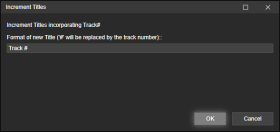
- 태그 편집을 마우스 오른쪽 버튼으로 클릭(또는 도구 > 태그 편집 사용)하고 제목 증가를 선택합니다.
- 새로 등록하려는 트랙에 들어갈 텍스트를 추가합니다.
문자 #은 트랙 번호로 대체됩니다.
예시
길 #
트랙 1
트랙 2
트랙 3
...
초승달 # 102개 중
초승달 1/102
초승달 2/102
초승달 3/102
...
Depending on your source - you may have hundreds of files in an audiobook from several CDs.
Each CD its own track numbers, which means you may end up with several identically named tracks in the entire album.
A nightmare for some audio players to gifure out the correct order.Track Entitler merely offers the possiblilty to automatically name the tracks based on the track number.
Process
- Make sure all files have Track Numbers in correct, sequential order.
- Select all tracks you want re-entitled.
- Right-click Edit Tags (or use the Tools > Edit Tags), and select Increment Titles.
- Add the text that you want your newly entitled tracks to have.
The character # will be replaced by the track number.Examples
Track #
Track 1
Track 2
Track 3
...
New Moon # of 102
New Moon 1 of 102
Hide original
New Moon 2 of 102
New Moon 3 of 102
...
By
ConcernedWife
제출자 ConcernedWife
업데이트됨 08/10/2025
버전 기록 / 세부 정보
- 버전:
- 1.0.2
- 업데이트됨:
- 08/10/2025
- Size:
- 2.41 KB
- 다음과 함께 작동합니다:
- Media Monkey 5 - 5
- 변경 사항:
Initial version