MediaMonkey 5의 오디오와 비디오를 미세 조정합니다. Winamp 호환 플러그인을 포함한 자세한 내용은 MediaMonkey 4/5 카테고리를 참조하세요.
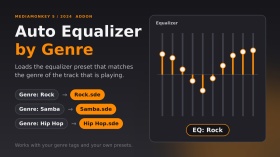
트랙이 변경될 때, 해당 트랙의 장르에 따라 이퀄라이저 프리셋을 자동으로 불러옵니다. 프리셋 파일은 이퀄라이저 폴더 안에 있는 장르 이름과 정확히 일치하는 파일이어야 합니다(예: "록" 장르 → EqualizerRock.sde). 프리셋이 없는 장르의 경우 현재 이퀄라이저 설정이 유지됩니다. 여러 장르("록; 팝")를 지원하는 경우, 프리셋 파일이 있는 첫 번째 장르의 설정이 사용됩니다. 프리셋이 변경될 때 "EQ: 록"이라는 짧은 메시지가 표시됩니다.
MediaMonkey 2024.2.2.3222(Windows)에서 테스트되었습니다. DiddeLeeDoo가 2006년에 작성한 AutoEQ.vbs 스크립트에서 영감을 받아 MediaMonkey 5용으로 처음부터 새로 작성된 코드입니다.
포르투갈어: carrega automaticamente o Preset do Equalizador Conforme o gênero da faixa. O arquivo do preset deve ter o mesmo nome do gênero, dentro da 파스타 Equalizer.
Translated automatically (see original)Automatically loads an equalizer preset when the track changes, based on the track’s genre. The preset must be a file named exactly like the genre inside the Equalizer folder (e.g. genre “Rock” → EqualizerRock.sde). Genres without a preset keep your current equalizer settings. Multiple genres (“Rock; Pop”) are supported: the first one with a preset file is used. A short “EQ: Rock” message shows when the preset changes.
Tested on MediaMonkey 2024.2.2.3222 (Windows). Inspired by the 2006 script AutoEQ.vbs by DiddeLeeDoo; this addon is original code written from scratch for MediaMonkey 5.
Em português: carrega automaticamente o preset do equalizador conforme o gênero da faixa. O arquivo do preset deve ter o mesmo nome do gênero, dentro da pasta Equalizer.
Hide original
By
Fernando Santos & Claude
제출자 FernandoSantos
업데이트됨 14/10/2026
버전 기록 / 세부 정보
- 버전:
- 1.1
- 업데이트됨:
- 14/10/2026
- Size:
- 2.99 KB
- 특허:
- MIT (permite usar e modificar, mantendo os crédito
- 다음과 함께 작동합니다:
- Media Monkey 2024.2
- 변경 사항:
Version 1.1.0 - first public release.
- Automatically loads the equalizer preset that matches the track's genre (Equalizer<Genre>.sde).
- Finds the Equalizer folder on its own (no fixed paths).
- Genres without a preset keep your current EQ (the file is checked first, because loading a missing preset resets the EQ to flat).
- Multiple genres (Rock; Pop) supported: the first one with a preset is used.
- Short "EQ: <preset>" message that disappears on its own.
Tested only on MediaMonkey 2024.2.2.3222 (Windows).Versão 1.1.0 - primeira versão pública.
- Carrega automaticamente o preset do equalizador correspondente ao gênero da faixa (Equalizer<Gênero>.sde).
- Encontra a pasta Equalizer sozinho (sem caminhos fixos).
- Gêneros sem preset mantêm o seu EQ atual (o arquivo é verificado antes, pois carregar um preset inexistente zera o EQ).
- Vários gêneros (Rock; Pop): usa o primeiro que tiver preset.
- Aviso rápido "EQ: <preset>" que some sozinho.
Testado apenas no MediaMonkey 2024.2.2.3222 (Windows).
이것은 MediaMonkey 5에 CD 굽기 기능이 포함되기 전에 만들어진 레거시 애드온입니다.
이 애드온은 더 이상 원래 목적으로 필요하지 않지만 MediaMonkey 5에서 MediaMonkey 4로 트랙을 보내 CD 굽기 외에 다른 작업을 트랙에서 수행할 수 있으므로 계속 사용할 수 있습니다(예: 데이터 CD를 굽거나 MediaMonkey 4에서만 사용 가능한 애드온으로 트랙에서 작업을 수행하려는 경우).
- 원하는 트랙을 선택하세요.
- 마우스 오른쪽 버튼을 클릭하고 보내기 -> CD/DVD(MM4를 사용하여 굽기)...
- 그러면 MM4가 지금 재생 중 목록에 트랙을 추가하여 열립니다.
- 지금 재생 중인 트랙을 선택하세요. 보내기 -> CD/DVD/BD(굽기)...를 눌러 CD 굽기 마법사를 엽니다.
This is a legacy addon, created before MediaMonkey 5 included CD burning functionality.
The addon is no longer needed for its original purpose, but is still available as it allows you to send tracks from MediaMonkey 5 to MediaMonkey 4 to perform other operations on the tracks aside from CD Burning (e.g. if you wish to burn a data CD, OR perform an operation on the tracks with an addon that is only available for MediaMonkey 4).
Hide original
- Select the desired tracks.
- Right click, Send to -> CD/DVD (Burn using MM4)...
- MM4 will then open with the tracks added to the Now Playing list.
- Select the tracks in Now Playing. Send to -> CD/DVD/BD (Burn)... to open the CD burning wizard.
By
Ventis Media, Inc.
제출자 drakinite
업데이트됨 13/04/2022
.png)
MediaMonkey v5 및 2024와 호환됩니다!
Windows용 MediaMonkey는 시스템에 이미 설치된 코덱을 사용하여 대부분의 오디오/비디오 형식을 재생, 캐스팅 또는 인코딩할 수 있습니다. 특정 코덱이 설치되어 있지 않은 경우 이 플러그인은 다음에 대한 지원을 추가합니다.
- aac(.m4a, .m4b), h.264(.mp4, .m4v, .mkv), mpeg4(.avi), + flash, .mov 및 mpeg 재생
- aac(.m4a), alac, h.264(.mp4, .mkv), mpeg4(.mp4, .mkv)로 인코딩/변환
- 비디오 자막(.srt 파일)
체험판의 코덱은 30일 동안만 작동합니다.
Translated automatically (see original)Compatible with MediaMonkey v5 and 2024!
MediaMonkey for Windows can play, cast, or encode most audio/video formats using codecs already installed on your system. If you don't have certain codecs installed, this plugin adds support for:
- Playback of aac (.m4a, .m4b), h.264 (.mp4, .m4v, .mkv), mpeg4 (.avi), + flash, .mov, and mpeg
- Encoding/conversion to aac (.m4a), alac, h.264 (.mp4, .mkv), and mpeg4 (.mp4, .mkv)
- Video subtitles (.srt files)
Codecs in the trial version are limited to 30-days of operation.
Hide original
By
Ventis Media, Inc.
제출자 jiri
업데이트됨 23/12/2025
버전 기록 / 세부 정보
- 버전:
- 3.0.12
- 업데이트됨:
- 23/12/2025
- 특허:
- Trial
- 다음과 함께 작동합니다:
- Media Monkey 5 - 2024.9
- 변경 사항:
This is a minor update that:
- improves m4a efficiency & support
- updates a couple of strings for clarity
- 버전:
- 3.0.10
- 업데이트됨:
- 05/02/2025
- 특허:
- Trial
- 다음과 함께 작동합니다:
- Media Monkey 5.0 - 2024.9
- 변경 사항:
This update is required if you installed codec pack 3.0.9 which was missing the aac encoding functionality.
If you're currently on version 3.0.8, the update can be considered optional--it contains updates to the LAV filter component.
- 버전:
- 3.0.8
- 업데이트됨:
- 05/12/2024
- 특허:
- Trial
- 다음과 함께 작동합니다:
- Media Monkey 5.0 - 2024.9
- 변경 사항:
This is a minor update and isn't required unless you experience a crash with the MediaMonkey codec 3.0.7
- Fixed crash that can occur if m4a encoding settings are corrupted
- Renamed the addon so that it's clear that it works with MMW 5 and 2024
- 버전:
- 3.0.7
- 업데이트됨:
- 05/12/2024
- 특허:
- Trial
- 다음과 함께 작동합니다:
- Media Monkey 5.0 - 2024.9
- 변경 사항:
This is a minor update and isn't required unless you experience a crash with the MediaMonkey codec 3.0.7
- Fixed crash that can occur if m4a encoding settings are corrupted
- Renamed the addon so that it's clear that it works with MMW 5 and 2024
- 버전:
- 3.0.7
- 업데이트됨:
- 28/08/2022
- 특허:
- Trial
- 다음과 함께 작동합니다:
- Media Monkey 5.0 - 5.9
- 변경 사항:
- ALAC conversion fix
- Updated icon
- 버전:
- 3.0.6
- 업데이트됨:
- 09/12/2021
- 특허:
- Trial
- 다음과 함께 작동합니다:
- Media Monkey 5.0 - 5.9
- 변경 사항:
- Updated lav filter
- Fixed crash with malformed m4a files
- 버전:
- 3.0.5
- 업데이트됨:
- 26/02/2021
- 특허:
- Trial
- 다음과 함께 작동합니다:
- Media Monkey 5.0 - 5.9
- 변경 사항:
- WEBM/VP9 conversion fix
- 버전:
- 3.0.4
- 업데이트됨:
- 26/02/2021
- 특허:
- Trial
- 다음과 함께 작동합니다:
- Media Monkey 5.0 - 5.9
- 변경 사항:
- Volume leveling fix re. xing header
- 버전:
- 3.0.3
- 업데이트됨:
- 26/05/2020
- 특허:
- Trial
- 다음과 함께 작동합니다:
- Media Monkey 5.0 - 5.9
- 변경 사항:
- Fixes playback issue with certain alac files
- 버전:
- 3.0.2
- 업데이트됨:
- 05/12/2019
- 특허:
- Trial
- 다음과 함께 작동합니다:
- Media Monkey 5.0 - 5.9
- 변경 사항:
- Fixes crash that occurs with some alac files
트랙 사이에 설정 가능한 x초의 일시 정지를 삽입합니다.
참고:
- 침묵 지속 시간은 추가 기능 목록을 통해 설정할 수 있습니다.
- 플레이 메뉴를 통해 켜거나 끌 수 있습니다.
Inserts a configurable pause of x seconds between tracks.
Notes:
Hide original
- Silence duration is configurable via the addons list
- It can be toggled on/off via the Play menu
By
Jiri & Rusty
제출자 jiri
업데이트됨 10/08/2026
버전 기록 / 세부 정보
- 버전:
- 1.0
- 업데이트됨:
- 10/08/2026
- Size:
- 7.65 KB
- 특허:
- Ventis Reciprocal License
- 다음과 함께 작동합니다:
- Media Monkey 5.0 - 2024.9
- 변경 사항:
Initial version. Created based on user's request.