MediaMonkey의 모양과 느낌을 사용자 정의합니다.

특정 패널을 별도의 창으로 도킹 해제하는 기능을 제공합니다. 현재 지원되는 패널:
- 지금 재생 중 (â를 클릭한 다음 도킹 해제를 클릭하세요)
- 가사
- 재생 목록(미디어 트리에서 재생 목록을 마우스 오른쪽 버튼으로 클릭하거나 기본 패널에서 â를 클릭한 다음 도킹 해제를 클릭합니다)
Provides the ability to undock certain panels into a separate window. Currently supported panels:
Hide original
- Now Playing (Click on â and then click Undock)
- Lyrics
- Playlists (Right click on a playlist in the Media Tree, or click on â in the main panel, then click Undock)
By
Ventis Media, Inc.
제출자 drakinite
업데이트됨 30/11/2024
버전 기록 / 세부 정보
- 버전:
- 1.3
- 업데이트됨:
- 30/11/2024
- Size:
- 18.35 KB
- 다음과 함께 작동합니다:
- Media Monkey 2024.0.0
- 변경 사항:
Fixed Playing List not respecting "Simplified List"/"List" setting
Fixed crashes on MM2024.0.0
- 버전:
- 1.2.1
- 업데이트됨:
- 25/02/2022
- Size:
- 7.89 KB
- 다음과 함께 작동합니다:
- Media Monkey 5.0.0
- 변경 사항:
Added "toggling" support for undock hotkeys. Hitting the undock hotkey twice will close the dialog instead of opening a second one.
- 버전:
- 1.2
- 업데이트됨:
- 25/02/2022
- Size:
- 6.87 KB
- 다음과 함께 작동합니다:
- Media Monkey 5.0.0
- 변경 사항:
Added support for Playlists.
- 버전:
- 1.1.1
- 업데이트됨:
- 24/02/2022
- Size:
- 3.24 KB
- 다음과 함께 작동합니다:
- Media Monkey 5.0.0
- 변경 사항:
- Added the ability to make keyboard shortcuts for undocking panels
- Fixed Lyrics undocked window not having a title
- Made the icon play more nicely with the new Lyrics Font Size sample addon
- 버전:
- 1.1
- 업데이트됨:
- 24/02/2022
- Size:
- 2.75 KB
- 다음과 함께 작동합니다:
- Media Monkey 5.0.0
- 변경 사항:
- Added support for Lyrics
- Added support for List in Playing
- Renamed to Undock Panels
- 버전:
- 1.0
- 업데이트됨:
- 10/02/2022
- Size:
- 1.75 KB
- 다음과 함께 작동합니다:
- Media Monkey 5.0.0

가사 창에 글꼴 크기 조절 버튼을 추가하는 작은 샘플 애드온입니다.
Translated automatically (see original)Small sample addon which adds font size control buttons to the Lyrics window.
Hide original
By
Ventis Media, Inc.
제출자 drakinite
업데이트됨 24/02/2022
스크롤 막대를 더 잘 보이도록 수정하고, 스킨 색상을 유지하면서 네이티브와 비슷한 스크롤 버튼을 추가합니다.
모든 스킨과 호환되지만, 네이티브 스크롤바 와는 호환되지 않습니다.
Translated automatically (see original)Modifies the scroll bars to be more visible, and adds native-like scroll buttons while respecting skin colors.
Compatible with all skins, but incompatible with Native Scrollbars.
Hide original
By
Ventis Media, Inc.
제출자 drakinite
업데이트됨 19/03/2022
MediaMonkey가 스킨의 스크롤바를 무시하고 브라우저의 기본 스크롤바를 사용하도록 합니다.
모든 스킨과 호환되지만, 수정된 스크롤바 와는 호환되지 않습니다.
Translated automatically (see original)Forces MediaMonkey to use the browser's native scrollbars, ignoring those from skins.
Compatible with all skins, but incompatible with Modified Scrollbars.
Hide original
By
Ventis Media, Inc.
제출자 drakinite
업데이트됨 19/03/2022
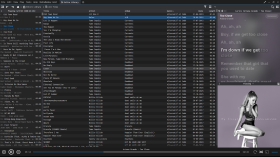
MediaMonkey용 음절 가사
Syllable Lyrics는 MediaMonkey 5 및 MediaMonkey 2024에 단어별 동기화된 노래방 하이라이팅 기능을 추가합니다.
특징
- 재생과 동기화된 단어 및 음절 강조 표시
- 클릭 가능한 시간 제한 검색 라인
- 활성화된 가사 라인의 부드러운 자동 중앙 정렬
- 내장된 향상된 LRC 및 TTML 단어 타이밍
- 일반 LRC 회선 타이밍 및 평문 대체
- 제공자가 제공하는 경우 백그라운드 보컬 및 교대 가수 배치
- Lyrics+와 호환되는 KPOE, Unison 및 LRCLIB 온라인 조회 기능
- 선택적 제공업체 또는 Google 기반 로마자 표기
- 일반 모드와 전체 화면 모드에서 현재 앨범 아트 배경이 흐릿하게 표시됩니다.
- 설정 가능한 타이밍 오프셋, 온라인 조회 및 부드러운 스크롤링
Syllable Lyrics for MediaMonkey
Syllable Lyrics adds synchronized word-by-word karaoke highlighting to MediaMonkey 5 and MediaMonkey 2024.
FeaturesHide original
- Word and syllable highlighting synchronized with playback
- Clickable timed lines for seeking
- Smooth automatic centering of the active lyric line
- Embedded enhanced LRC and TTML word timing
- Ordinary LRC line timing and plain-text fallback
- Background vocals and alternating singer alignment when supplied by the provider
- Lyrics+ compatible KPOE, Unison, and LRCLIB online lookup
- Optional provider or Google-powered romanization
- Blurred current-album-art backgrounds in normal and fullscreen modes
- Configurable timing offset, online lookup, and smooth scrolling
By
GhosT
제출자 ghost.specialgrade
업데이트됨 12/10/2026
버전 기록 / 세부 정보
- 버전:
- 0.1.22
- 업데이트됨:
- 12/10/2026
- Size:
- 37.24 KB
- 특허:
- MIT License
- 다음과 함께 작동합니다:
- Media Monkey 5.0 - 2024
- 변경 사항:
Added new lyrics providers
- 버전:
- 0.1.21
- 업데이트됨:
- 08/08/2026
- Size:
- 27.51 KB
- 특허:
- MIT License
- 다음과 함께 작동합니다:
- Media Monkey 5.0 - 2024
- 변경 사항:
Syllable Lyrics v0.1.21
This release improves synchronized lyric discovery, dual-script romanization, karaoke animation, scrolling, and fullscreen presentation for MediaMonkey 5 and MediaMonkey 2024.
What’s New
- Added synchronized dual-script lyrics that preserve both original and romanized text
- Added word-by-word karaoke wipes for both scripts when aligned syllable timing is available
- Added an option to display romanized lyrics as the primary text
- Added BiniLyrics lookup with TTML word-timing support
- Improved Lyrics+, Unison, and LRCLIB parsing and provider prioritization
- Word-timed lyrics now consistently outrank line-timed and plain-text results
- Provider-supplied transliteration is preferred, with optional Google-powered romanization as a fallback
- Added background-vocal and alternating-singer presentation
- Added manual lyric scrolling with a five-second pause before automatic centering resumes
- Improved active-line depth, glow, shadows, karaoke wipes, and character animation
- Improved normal and fullscreen album-art backgrounds
- Fixed inherited fullscreen text-shadow artifacts
- Added additional parsing, provider-priority, romanization, and timing regression tests
Romanization
The original and romanized lyrics remain visible together. You can choose which script appears as the primary text.
For word-timed lyrics with aligned transliteration, both scripts share the same timestamps and receive synchronized karaoke wipes. Line-only transliteration remains visible but cannot provide a true word-by-word wipe without aligned timing.
- 버전:
- 0.1.20
- 업데이트됨:
- 19/07/2026
- Size:
- 25.15 KB
- 특허:
- MIT License
- 다음과 함께 작동합니다:
- Media Monkey 5.0.0 - 5.0.0

이 애드온은 마우스를 올려놓았을 때만 탭 닫기 버튼이 다시 표시되도록 전환합니다.
Translated automatically (see original)This addon switches the tab close buttons back to only show when the mouse is hovering over them.
Hide original
By
Ventis Media, Inc.
제출자 drakinite
업데이트됨 08/12/2020